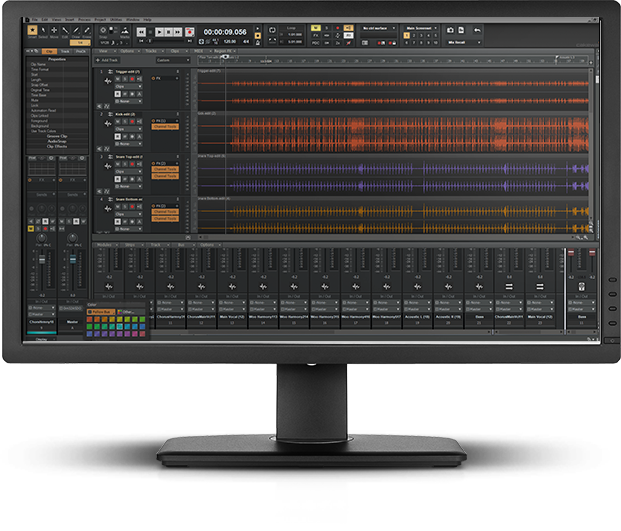
 Предлагаем Вашему вниманию полный список "горячих" клавиш Sonar
Значок (+) означает что обе клавиши должны быть нажаты одновременно. Например, Ctrl+F6.
Команды меню
|
Команда |
"Горячие" клавиши | |
|
File-Open |
File-Открыть |
Ctrl+O |
|
File-Save |
File-Сохранить |
Ctrl+S |
|
Edit-Undo |
Отменить редактирование |
Ctrl+Z |
|
Edit-Redo |
Вернуть редактирование |
Ctrl+Shift+Z |
|
Edit-Select-All |
Выделить все |
Ctrl+A |
|
Edit-Select-None |
Снять выделение |
Ctrl+Shift+A |
|
Edit-Cut |
Вырезать |
Ctrl+X |
|
Edit-Copy |
Копировать |
Ctrl+C |
|
Edit-Paste |
Вставить |
Ctrl+V |
|
Edit-Groove Clip Looping |
Ctrl+L | |
|
Edit-Clip Mute/Unmute |
Включить/Выключить клип |
Q |
|
Edit-Isolate Clip(s) in Layer |
Shift+1 | |
|
Edit-Delete |
Удалить |
Delete key |
|
Insert-Marker |
Вставить-Маркер |
F11 |
|
Transport-Play |
Воспроизведение |
Spacebar |
|
Transport-Record |
Запись |
R |
|
Transport-Rewind |
W | |
|
Transport-Stop |
Стоп |
Spacebar |
|
Transport-Tempo Ratio 1 |
Ctrl+1 | |
|
Transport-Tempo Ratio 2 |
Ctrl+2 | |
|
Transport-Tempo Ratio 3 |
Ctrl+3 | |
|
Go-Time |
F5 | |
|
Go-From |
F7 | |
|
Go-Thru |
F8 | |
|
Go-Beginning |
Ctrl+Home | |
|
Go-End |
Ctrl+End | |
|
Go-Previous Measure |
Ctrl+PageUp | |
|
Go-Next Measure |
Ctrl+PageDown | |
|
Go-Previous Marker |
Ctrl+Shift+PageUp | |
|
Go-Next Marker |
Ctrl+Shift+PageDown | |
|
Go-Search Next |
F3 | |
|
Tools-Run CAL |
Выполнить CAL |
Ctrl+F1 |
Track View
|
Команда |
"Горячие" клавиши | |
|
Show/Hide Large Transport |
F4 | |
|
Solo/un-solo current track |
/ | |
|
Help |
F1 | |
|
Close Window |
Ctrl+F4 | |
|
Insert track |
вставить трек |
Insert |
|
Open the Track Manager |
M | |
|
Show/hide Bus pane |
Shift+B | |
|
Toggle Envelope/Offset Mode |
O | |
|
Select current track |
, (comma key) | |
|
Show and fit selection |
Shift+S | |
|
Fit tracks to window |
F | |
|
Fit project to window |
Shift+F | |
|
Show only selected tracks |
H | |
|
Hide selected tracks |
Shift+H | |
|
Show all tracks |
A | |
|
Undo view change |
U | |
|
Redo view change |
Shift+U | |
|
Snap enable/disable |
N | |
|
Open Snap dialog |
Shift+N | |
|
Activate Zoom tool |
Z | |
|
Fast Zoom In |
Ctrl+= | |
|
Fast Zoom Out |
Ctrl+- | |
|
Decrease track height |
Ctrl+Up arrow | |
|
Increase track height |
Ctrl+Down arrow | |
|
Zoom in horizontally |
Ctrl+Right arrow | |
|
Zoom out horizontally |
Ctrl+Left arrow | |
|
Zoom all tracks in vertically |
Ctrl+Down arrow | |
|
Zoom all tracks out vertically |
Ctrl+Up arrow | |
|
Zoom out on all audio waveforms |
Alt+Down arrow | |
|
Zoom in on current track's audio waveforms |
Alt+Ctrl+Up arrow | |
|
Zoom out on current track's audio waveforms |
Alt+Ctrl+Down arrow | |
|
Zoom current track in vertically |
Ctrl+Shift+Down arrow | |
|
Zoom current track out vertically |
Ctrl+Shift+Up arrow | |
|
Zoom in on all audio waveforms |
Alt+Up arrow | |
|
Increase current track height |
Ctrl+Shift+Down arrow | |
|
Decrease current track height |
Ctrl+Shift+Up arrow | |
|
Scale audio waveform in all audio tracks |
Alt+up/Down arrow | |
|
Scale audio waveform in current audio track |
Ctrl+Alt+up/Down arrow | |
|
Lasso zoom scale audio clip/waveform |
Shift+Z (while selecting a clip) | |
|
Scissors tool |
C | |
|
Center Now time |
G | |
|
Puts focus in Track pane |
Shift+Up arrow | |
|
Puts focus in Bus pane |
Shift+Down arrow | |
|
Scroll Track view up or down |
Page Up or Page Down | |
|
Move between same controls in different tracks |
Up or Down arrow | |
|
Move between controls in same track |
Left or Right arrow | |
|
Moves to the previous or next tab in Track pane (All, Mix, FX, I/O), or between views in tabs |
Shift+Left arrow or Shift+Right arrow | |
|
Raise or lower the pitch of a loop-enabled clip |
Alt+ or Alt- (use the + or - keys on the NumPad) | |
|
Activate Select tool |
T | |
|
Activate Scrub tool |
B | |
|
Activate Envelope Edit tool |
E | |
|
Loop enable/disable selected clip |
Ctrl+L | |
|
Split selected clips at Now time |
разрезать |
S |
|
Auto crossfade |
X | |
|
Toggle on/off "sticky" Now Time |
Ctrl+Spacebar | |
|
Toggle display of the Track Inspector |
I | |
|
Open/close current track folder |
Ctrl+F | |
|
Mute tool on/off |
K | |
|
Show/hide Navigator pane |
D | |
|
Show/hide Video Thumbnail pane |
L | |
|
Nudge left 1 |
Сдвиг |
NumPad 1 |
|
Nudge right 1 |
Сдвиг |
NumPad 3 |
|
Nudge left 2 |
Сдвиг |
NumPad 4 |
|
Nudge right 2 |
Сдвиг |
NumPad 6 |
|
Nudge left 3 |
Сдвиг |
NumPad 7 |
|
Nudge right 3 |
Сдвиг |
NumPad 9 |
|
Nudge up |
Сдвиг |
NumPad 8 |
|
Nudge down |
Сдвиг |
NumPad 2 |
V-Vocal Editor
|
Команда |
"Горячие" клавиши | |
|
Open V-Vocal Editor |
Ctrl+Shift+V | |
|
Create V-Vocal Clip |
Shift+V |
Piano Roll View
|
Команда |
"Горячие" клавиши | |
|
Select tool |
S | |
|
Draw tool |
вы можете рисовать прямые |
D |
|
Pattern Brush Tool |
Q | |
|
Scrub tool |
B | |
|
Enter a Whole Note |
1 | |
|
Enter a Half Note |
2 | |
|
Enter a Quarter Note |
4 | |
|
Enter an Eighth Note |
8 | |
|
Enter a Sixteenth Note |
6 | |
|
Enter a Thirty-second Note |
3 | |
|
Dotted Note |
. | |
|
Triplet |
P | |
|
Snap enable/disable |
N | |
|
Open Snap dialog |
Shift+N | |
|
Pick Track |
T | |
|
Show/Hide Track Pane |
H | |
|
Show/Hide the Controller pane |
C | |
|
All Tracks |
A | |
|
No Tracks |
K | |
|
Invert Tracks |
V | |
|
Insert new MIDI data lane |
Shift+L | |
|
Show/Hide velocity tails in the Drum pane |
Y | |
|
Show/Hide Grid lines |
I | |
|
Show/Hide durations in the Drum pane |
O | |
|
Zoom tool |
Z | |
|
Scroll up/down |
Up or Down arrow keys | |
|
Scroll left/right |
Left or Right arrow keys | |
|
Zoom in vertically |
Ctrl+Down arrow | |
|
Zoom out vertically |
Ctrl+Up arrow | |
|
Undo Zoom |
U |
Step Sequencer View
|
Команда |
"Горячие" клавиши | |
|
Open the Step Sequencer View |
Alt+Shift+5 | |
|
Insert a new row above the selected row |
Insert | |
|
Delete the active row |
Delete | |
|
Move focus to the previous control |
Left arrow | |
|
Move focus to the next control |
Right arrow | |
|
When there are multiple strips, move focus to the same control on the previous row |
Up arrow | |
|
When there are multiple strips, move focus to the same control on the next row |
Down arrow | |
|
When focus is on a control in the steps pane, move focus to the strips pane |
Ctrl+Left arrow | |
|
When focus is on a control in the strips pane, move focus to the steps pane |
Ctrl+Right arrow | |
|
When focus is either on the steps or strips pane, move focus to the toolbar |
Ctrl+Up arrow | |
|
When focus is on the toolbar, move focus to the strips pane |
Ctrl+Down arrow | |
|
When focus is on steps, toggle step or tie on/off; for buttons, turn on/off |
Enter | |
|
When focus is on a step, allow velocity adjustment |
Shift+Enter | |
|
For spinner controls, increase/decrease value; fine adjust for knobs |
+ / - (plus and minus) | |
|
Coarse adjust for knobs |
[ / ] (square brackets) | |
|
Toggles the Audition (Play) button for the view |
Ctrl+Shift+Spacebar | |
|
When focus is on the steps pane, move focus to the next enabled note on the same row |
Tab | |
|
When focus is on the steps pane, move focus to the previous enabled note on the same row |
Shift+Tab | |
|
Shift the active row's steps by 1 step and wrap first step to the end |
Alt+Left arrow | |
|
Shift the active row's steps by 1 step and wrap the last step to the beginning |
Alt+Right arrow |
Staff View
|
Команда |
"Горячие" клавиши | |
|
Select tool |
S | |
|
Draw tool |
D | |
|
Erase tool |
E | |
|
Scrub tool |
B | |
|
Lyric |
Y | |
|
Chord |
C | |
|
Expression |
I | |
|
Hairpin |
H | |
|
Pedal |
A | |
|
Snap enable/disable |
N | |
|
Fill Durations |
F | |
|
Trim Durations |
M | |
|
Layout |
L | |
|
Pick Track |
T | |
|
Whole note |
1 | |
|
Half note |
2 | |
|
Quarter note |
4 | |
|
Eighth note |
8 | |
|
Sixteenth note |
6 | |
|
Thirty-second note |
3 | |
|
Dotted |
. | |
|
Triplet |
P | |
|
Scroll left/right |
Arrow keys | |
|
Play Previous Note |
Ctrl+Left arrow | |
|
Play Next Note |
Ctrl+Right arrow | |
|
Open Snap dialog |
Shift+N | |
|
Export to ASCII TAB |
X | |
|
Show/Hide Fretboard view |
V |
AudioSnap
|
Команда |
"Горячие" клавиши | |
|
AudioSnap Enable |
F12 | |
|
AudioSnap Add Transients To Pool |
Ctrl+F12 | |
|
AudioSnap Show Transient Markers |
Shift+F12 | |
|
AudioSnap Go to Next Transient Marker |
Tab | |
|
AudioSnap Go to Previous Transient Marker |
Shift+Tab | |
|
Set Measure Beat at Now |
Ctrl+M | |
|
AudioSnap Auto Stretch (Follow Tempo) |
Alt+F12 | |
|
AudioSnap Insert Marker |
Ctrl+Alt+I | |
|
AudioSnap Reset Selected Transient Marker(s) |
Ctrl+Alt+R | |
|
AudioSnap Delete Inserted Marker |
Ctrl+Alt+Backspace | |
|
AudioSnap Disable Marker |
Ctrl+Alt+D | |
|
AudioSnap Promote Marker |
Ctrl+Alt+P | |
|
AudioSnap Snap to Transients |
Ctrl+Alt+N | |
|
AudioSnap Audition Beat |
Ctrl+Shift+Spacebar | |
|
AudioSnap Show Palette |
Shift+A | |
|
AudioSnap Show Transient Pool |
Ctrl+Alt+F12 | |
|
AudioSnap Select All Markers |
Alt+Shift+A | |
|
AudioSnap Clear Selection |
Alt+Shift+C | |
|
AudioSnap Select Moved Markers |
Alt+Shift+M | |
|
AudioSnap Select Stretched Markers |
Alt+Shift+S | |
|
AudioSnap Select Disabled Markers |
Alt+Shift+D | |
|
AudioSnap Select Enabled Markers |
Alt+Shift+E | |
|
AudioSnap Select Promoted Markers |
Alt+Shift+P |
Event List View
|
Команда |
"Горячие" клавиши | |
|
Filter (hide) Note events |
N | |
|
Filter Key Aftertouch events |
F | |
|
Filter Controller events |
C | |
|
Filter Patch Change events |
A | |
|
Filter Channel Aftertouch Events |
F | |
|
Filter Pitch Wheel events |
B | |
|
Filter RPN events |
Z | |
|
Filter NRPN events |
P | |
|
Filter Sysx Bank events |
S | |
|
Filter Sysx Data events |
Y | |
|
Filter Text events |
X | |
|
Filter Lyric events |
L | |
|
Filter MCI Command events |
M | |
|
Filter Audio events |
U | |
|
Filter Shape events |
H | |
|
Filter Expression events |
E | |
|
Filter Hairpin events |
I | |
|
Filter Chord events |
O | |
|
Event Manager |
V | |
|
Insert event |
Insert | |
|
Delete event |
Delete | |
|
Play single event |
Ctrl+Shift+Spacebar | |
|
Pick Tracks |
T |
Console View (Микшер)
|
Команда |
"Горячие" клавиши | |
|
Move between controls |
Tab | |
|
Delete an effect |
Delete | |
|
Change values (small) |
+ and - | |
|
Change values (large) |
[ and ] | |
|
Open Module manager |
M | |
|
Toggle Envelope/Offset Mode |
O |
Loop Construction View
|
Команда |
"Горячие" клавиши | |
|
Save loop to wave file |
F | |
|
Enable looping |
L | |
|
Enable stretching |
T | |
|
Follow project pitch |
P | |
|
Preview loop |
Ctrl+Shift+Spacebar | |
|
Stop preview |
Ctrl+Shift+Spacebar | |
|
Select tool |
S | |
|
Erase marker tool |
E | |
|
Default all markers |
M | |
|
Enable Slice Auto-Preview |
A | |
|
Slice Auto-Preview Loop |
Shift+A | |
|
Clip Properties |
C | |
|
Move to Previous Slice |
PageUp | |
|
Move to Next Slice |
PageDown | |
|
Show/Hide Gain Envelope |
G | |
|
Show/Hide Pan Envelope |
N | |
|
Show/Hide Pitch Envelope |
K |
Loop Explorer View
|
Команда |
"Горячие" клавиши | |
|
Preview file |
Ctrl+Shift+Spacebar | |
|
Stop preview |
Ctrl+Shift+Spacebar |
Synth Rack View
|
Команда |
"Горячие" клавиши | |
|
Close view |
Alt+F4 | |
|
Move to next or previous synth |
Down Arrow or Up Arrow | |
|
Toggle connection for current synth |
Pause/Break | |
|
Increment or decrement current preset |
+ or - | |
|
Increment or decrement current preset by 10 |
] or [ | |
|
Navigate between synths |
Up/Down arrows | |
|
Change preset for current soft synth |
изменение пресета |
+ или - |
|
Insert |
A | |
|
Rename synth |
F2 | |
|
Properties |
P | |
|
Open Insert Soft Synth Options dialog |
O | |
|
Freeze |
F | |
|
Unfreeze |
U | |
|
Quick Unfreeze |
T | |
|
Mute current soft synth |
M | |
|
Solo current soft synth |
S |
All Views
|
Команда |
"Горячие" клавиши | |
|
Close Window |
Ctrl+F4 | |
|
Next Window |
Ctrl+F6 | |
|
Display the Track view |
Alt+0 (but not on the NumPad) | |
|
Open the Loop Explorer view |
Alt+1 | |
|
Open the Loop Construction view |
Alt+2 | |
|
Open the Console view |
Alt+3 | |
|
Open the Event List view |
Alt+4 | |
|
Open the Piano Roll view |
Alt+5 | |
|
Open the Step Sequencer view |
Alt+Shift+5 | |
|
Open the Video view |
Alt+6 | |
|
Open the Staff view |
Alt+7 | |
|
Open the Synth Rack view |
Alt+8 | |
|
Open the Tempo view |
Alt+9 |
Surround Panner (large)
|
Команда |
"Горячие" клавиши | |
|
Constrains to angle |
Alt+drag | |
|
Constrains to angle at 100% focus |
Alt+Shift+drag | |
|
Constrains to focus only |
Ctrl+Shift+drag | |
|
Sets panner point to the point that you click (large and medium panners only) |
Shift+click | |
|
Fine resolution |
Shift+drag controls (Angle, Width, etc.) | |
|
Move to next/previous widget in surround panner |
Up/Down cursor keys | |
|
Move to next/previous panner in same track |
Left/Right cursor keys | |
|
Move to surround panner in another track |
Ctrl+up/down | |
|
Speaker mutes |
Ctrl+NumPad 0-9 | |
|
Jump to speaker angle at 100% focus |
NumPad 0-9 | |
|
n/a |
NumPad 0 | |
|
Ls |
NumPad 1 | |
|
Cs |
NumPad 2 | |
|
Rs |
NumPad 3 | |
|
Sl |
NumPad 4 | |
|
n/a |
NumPad 5 | |
|
Sr |
NumPad 6 | |
|
L |
NumPad 7 | |
|
C |
NumPad 8 | |
|
R |
NumPad 9 | |
|
Lc |
/ | |
|
Rc |
* |